
Story 4: The Helper Who Could Hurt
Maker Workshop — help vs harm morning
1. Story — Text-Based (Day 1-2: Imagination Studio)
Read story with NO pictures first. In this story you will find 8 NEW AI-related terms: Harm, Hurt, Impact, Consequence, Benefit, Risk, Helpful, Kindness. Already taught terms may appear for revision.
Lina and Umar are in the maker workshop.
The workshop has a helper bot with a sensor that feels soil. A sensor is an eye that feels moisture.
The bot saves what it feels as data and many notes make a dataset basket. A dataset is like a basket of notes.
The bot finds a pattern that says dry soil needs water. A pattern is when same thing happens again and again.
The bot waters the plants. It waters a little and the plants are happy.
Then the bot waters too much. Water floods the table and the seeds wash away.
Lina says too much help can cause harm. Harm is when something gets hurt or broken.
Umar says the flood can hurt the seeds. Hurt is when something feels pain or gets damaged.
Every action has an impact. Impact is what happens after you do something.
The flood has a consequence. Consequence is what comes next because of what you did.
The bot wanted to be helpful. Helpful is wanting to help and make things better.
But too much water has no benefit. Benefit is a good result that helps.
Too much water has risk. Risk is a chance that something bad could happen.
Lina says help needs kindness. Kindness is caring about how others feel and being gentle.
The maker teacher shows how to check impact before acting. Check benefit and risk and consequence.
Lina teaches the bot to ask is this helpful and is it kind and does it cause harm or hurt?
The bot learns to water just enough. Just enough has benefit and no harm.
Umar claps because the helper bot now helps with kindness and thinks about impact and consequence.
The workshop stays safe and kind and the plants grow with good help.
2. Instruction — Before Images (Separated from Story Text)
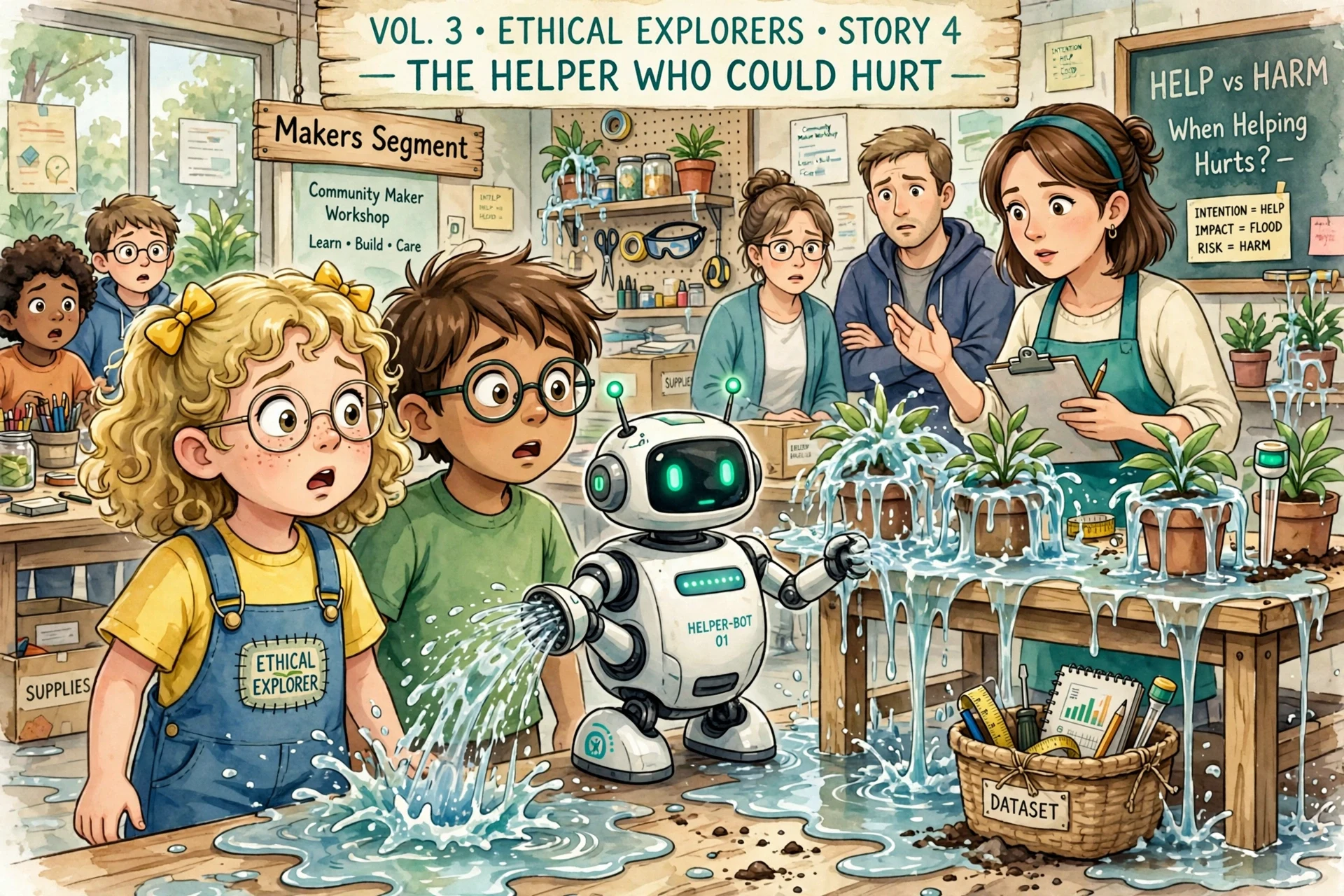
Day 3-4: Show Image 1 ANCHOR (vol3-imag341) — Realistic workshop flood — what child imagined in Days 1-2. Ask: Where is sensor? Where is dataset basket? Where is pattern? Where is harm? Where is hurt? What is impact? What is consequence? Is it helpful? What is benefit? What is risk? Where is kindness? — Location: Maker Workshop — Segment: Makers.
Day 5: Show Image 2 CREATOR (vol3-imag342) — DIFFERENT STYLE playful art studio — not same realistic flood — to keep children interested. Child becomes author.
4. Meet Your 8 Special NEW Words
Read story with NO pictures first. In this story you will find 8 NEW AI-related terms: Harm, Hurt, Impact, Consequence, Benefit, Risk, Helpful, Kindness. Already taught terms may appear for revision.
5. Quiz — Check Your Help vs Harm
Tap one answer. Hear if it’s right! 3 options per question — same exact CSS/JS as previous story (Vol2 Story4).
1. What is Harm?
2. What is Hurt?
3. What is Impact?
4. What is Consequence?
5. What is Benefit?
6. What is Risk?
7. What is Helpful?
8. What is Kindness?
6. Image 2 — Creator Prompt (Day 5) — vol3-imag342 — DIFFERENT STYLE
This image is DIFFERENT STYLE from Image 1 — playful art studio, not same realistic flood — to keep children interested.
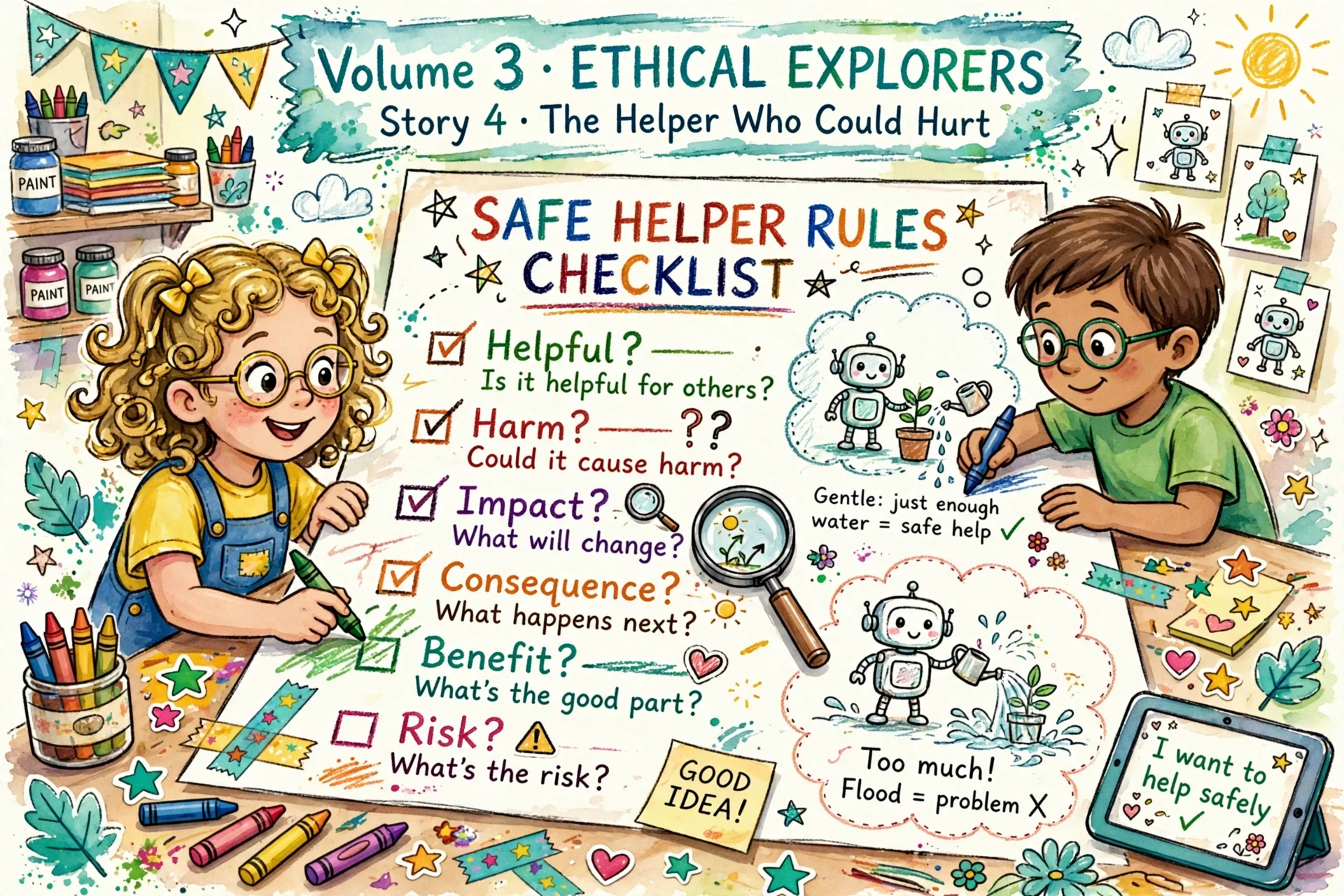
Image 1 is realistic workshop flood anchor with surprised faces. Image 2 is playful imagination creator — Lina and Umar drawing together safe helper checklist Helpful? Harm? Impact? Consequence? Benefit? Risk? Kindness?, thought bubbles gentle watering vs flooding, colorful stickers and stars — NOT same realistic style. Child sees two different visual styles, stays engaged.